
Front-end Coding Basics for Digital Marketers
Why Should Digital Marketers Know How to Code?
To become a full-stack digital marketer, you must be able to understand front-end coding. Specifically, you should know how to use HTML, CSS, and JavaScript. Having the ability to edit simple HTML and CSS code is an incredibly useful skill for digital marketers because you won’t have to consult the development team for minor changes. Many digital marketers have the responsibility of editing the copy on their company’s web pages, and if you know the basics of code, you can make those changes yourself and be more self-reliant.
Front-end code is how the web pages on a website work; it’s the part that users actually interact with and see. Front-end development uses 3 primary coding languages: HTML, CSS, in JavaScript (JS). While coding has the stigma of being hard and complicated, these three primary coding languages are easier to learn than you think and learning them can massively increase your effectiveness as a digital marketer.
The Basics of Front-End Web Development
HTML
HTML stands for hypertext markup language, and it was the key to opening the doors for making it easy for developers to create web pages on the Internet. When Netscape Navigator (the first “Internet” browser) launched, it allowed normal people (not just computer scientists) to access and create those web pages. HTML marks and describes the content of a web page so your browser displays the information correctly and efficiently. Think of HTML as the skeleton or bones of your website.
HTML is made up of tags and elements that make up a basic structure that includes several key components. First, there’s <!DOCTYPE html>, which is a declaration (not technically an element) that tells the browser the website uses HTML5, which allows your browser to show the information correctly. The <html> element signals that the important content is about to start. The <head> element contains meta information about the page, telling search engines what the webpage is all about. The <title> element specifies the page title that appears in your browser’s title bar or tab. Finally, the <body> element defines the document’s body and contains all visible content like headings, paragraphs, images, hyperlinks, tables, and lists.
Inside the body of the HTML, you’ll often see <h1></h1> tags for the heading, which is where the most important ten goes. You’ll also see <p></p> tags for paragraphs, where the bulk of the website’s text lives.
As a digital marketer, you are luckily not expected to create a website from scratch. However, editing HTML source code allows you to modify the website’s copy without having to ask the developer team to edit the HTML source code. If you understand the basics, editing HTML is quite simple. For example, if your website has a certain date written down for an event and the date changes, you can edit the source code yourself to change it to the correct date. Knowing how to edit the HTML source code also helps you implement SEO strategies into your web pages. Understanding how search engines crawl your website means you can optimize your site easily through the HTML source code by adding keywords directly Two important sections like the headings.
CSS
CSS stands for Cascading Style Sheets, and it is what makes websites visually appealing. HTML looks boring and simple without CSS, which adds style properties like fonts, colors, and text elements. If HTML is the skeleton, CSS is the skin. While HTML dictates the words on the web page, CSS dictates the look and the style.
CSS style rules “cascade” over the entire web page, hence the name. If you style an <h1> element in a certain way and label it with a keyword, that tells the browser to display all <h1> elements in the same style throughout the entire website. For example, if you write h1{color:blue; font-size: 42px;}, all h1 headings will have this style throughout your site.
Knowing how to change the style of a website is a crucial skill for digital marketers. If you want to adjust the color, font size, or font style of your website, you can do this by editing the CSS. There’s no need to consult or wait for web developers to change it for you, which saves a significant amount of time.
JavaScript
JavaScript (JS) is the brain of the website. While HTML provides structure and CSS provides style, JS gives interactivity and motion to your website. JS is actually the most popular programming language in the world, which is another reason why knowing the basics of JS can be a useful asset. JS uses functions to give your web page specific results, and these functions are tied into if-then statements. For example, “if” a visitor scrolls halfway down the website, “then” a pop-up message will appear.
JS is definitely more complicated than HTML and CSS, but it is what gives your website true interactivity. While you will probably not have to write JS from scratch as a digital marketer, knowing how it works can help you make minor edits to the website and understand how the interactive elements function on your brand’s website.
Learning to Code in Code Academy
Learning to code through an online course is sufficient for to learn the skills a digital marketer should have to be successful. Code Academy offers short courses that teach you the basics of HTML, CSS, and JavaScript, enabling you to perform simple tasks like editing copy, slightly changing the website’s style, or adding small interactive elements. As a digital marketer, you’re not required to have software engineering skills. These online courses provide enough knowledge to “code” at a digital marketing level, and they’re great for learning task-oriented skills. Codecademy is particularly great for absolute basics, with courses taking just 5-7 hours to complete.
My Experience Creating & Editing Websites in VSCode
I created a hypothetical eCommerce website where I would sell laser prints I made, building it completely with HTML, CSS, and JavaScript for a computer science class. I’m currently working towards Content Development Certificate at WWU, where I’m learning front-end web development. This hands-on experience has shown me exactly how these languages work together in real projects.
The HTML
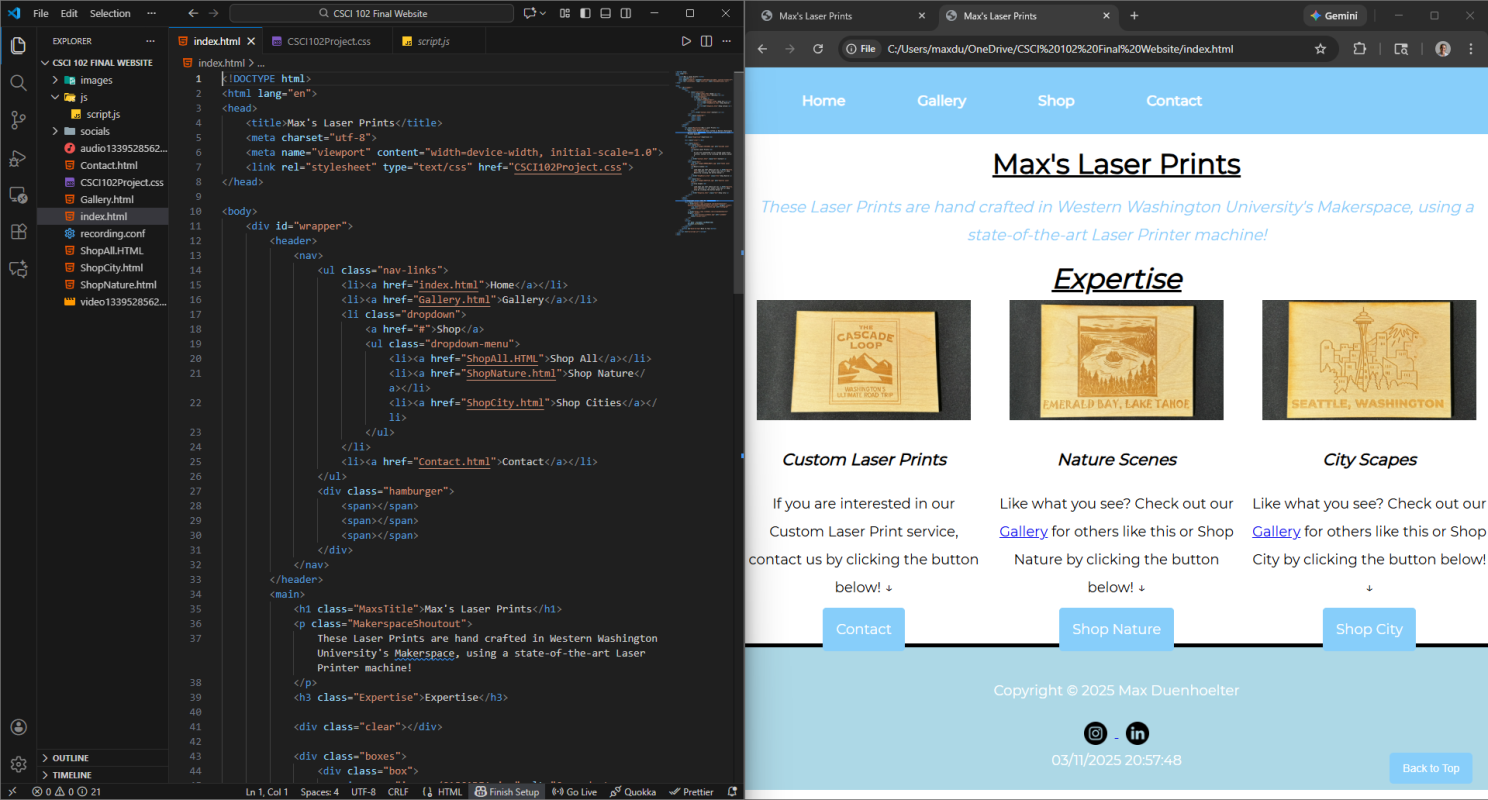
In VSCode, the code on the left directly corresponds with how the website appears on the right. The header and navigation code, for example, shows up exactly as programmed on the live site. One particularly useful feature I implemented is the hamburger menu. When the website is viewed on different-sized screens, the navigation menu automatically transforms into a compact hamburger menu, making the site mobile-friendly without any additional effort.
The CSS
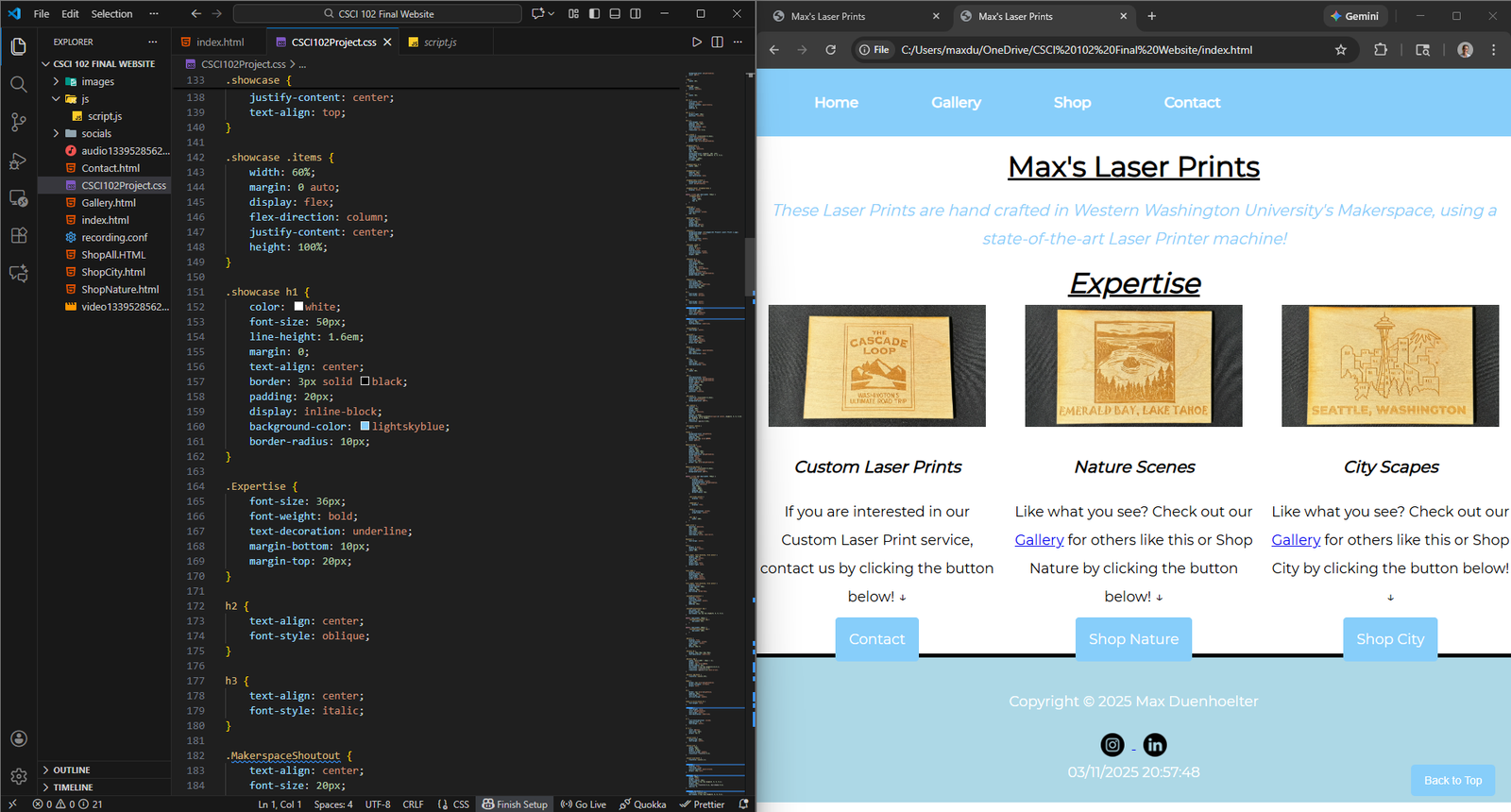
The CSS code on the left side of VSCode directly influences the website’s design and style on the right. For instance, the showcase h1 instructions change the style of text in the navigation menu, controlling elements like size, color, and spacing. The “.expertise” instructions influence the style of the “expertise” text section on the webpage, which shows how CSS rules allow you to create consistent styles throughout your site.
The JavaScript
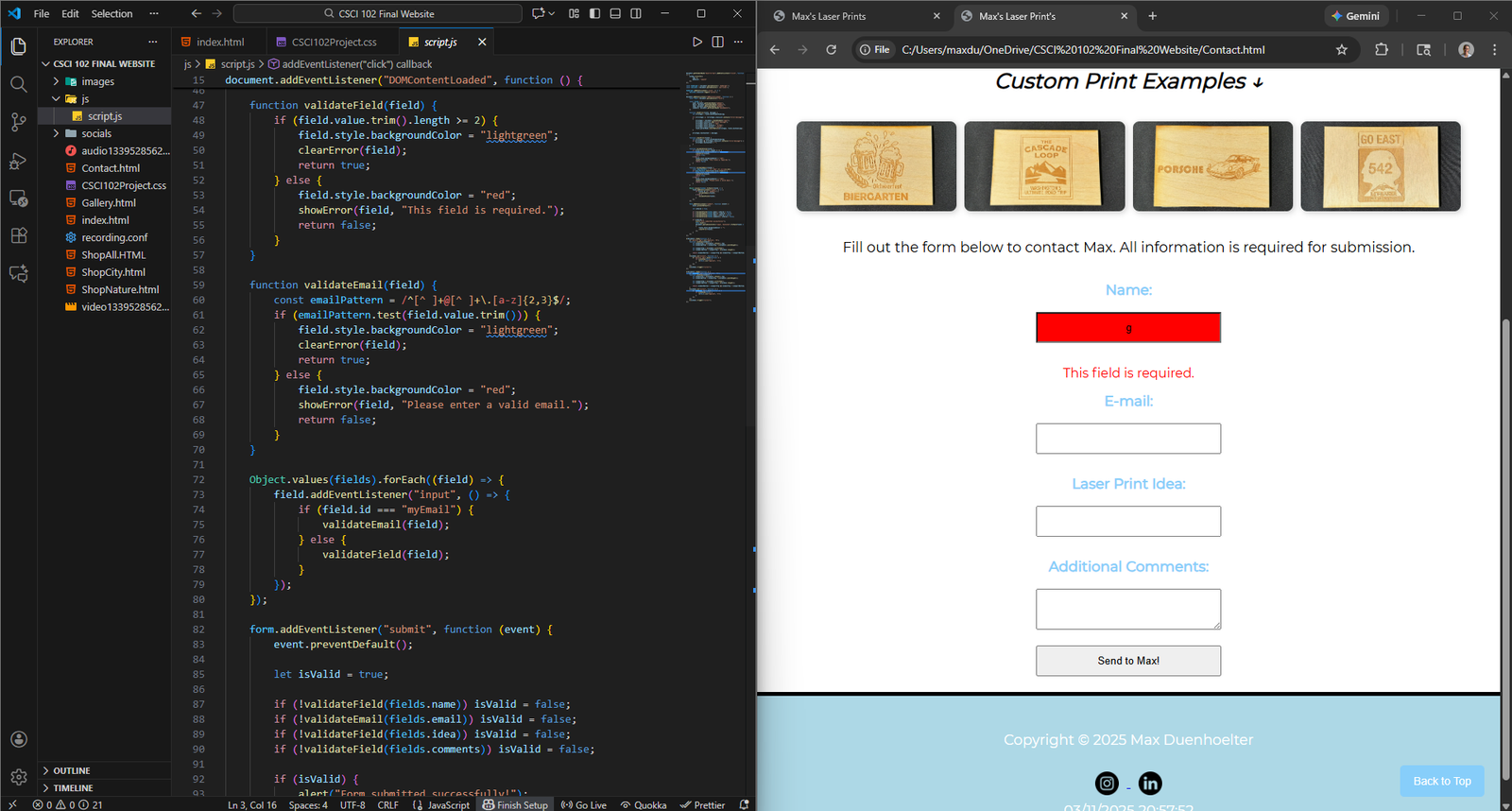
The JS code on the left dictates the webpage’s interactive behavior on the right. My “validate email” function, for example, controls the color of the text box based on user input. If the text entry is less than 2 characters, the box appears red as a warning. If it’s 2 characters or more, the box turns green to confirm valid input. These JS functions change the interactivity of the website in meaningful ways. The “submit” function I created only allows users to submit their form if all text entries are correctly filled out, preventing incomplete submissions.
Wrap Up
Many people have the idea that coding is hard and complicated, but front-end development isn’t too difficult to grasp. Knowing how to edit HTML, CSS, and JS can be a great skill for a digital marketer, and understanding the basics of code is essential to becoming a full-stack digital marketer. While creating something completely new using only code is quite challenging, fortunately, that is not a digital marketer’s job. Learning how to code through Code Academy is a great resource for digital marketers, because we just need to know how to make small changes so that we don’t have to constantly consult the development team to make changes to our brand’s website.